ဒီနည္းကို မေန႔ကတည္းက ေျပာျပခ်င္ေနခဲ့တာပါ.. ကၽြန္ေတာ္လည္း ညီးေလးတစ္ေယာက္ ေျပာျပလို႔ လုပ္ၾကည့္တာ. ခဏေလးပဲၾကာတယ္.. လုပ္နည္း ၾကည့္ရေအာင္..
ပထမဆံုး ကိုယ့္မွာ Facebook Account မဖြင့္ရေသးတဲ့ Gmail သစ္ တစ္ခု ရွိထားရပါမယ္.. မရွိရင္ Gmail အျမန္ဖြင့္နည္း ေျပာျပပါမယ္..
1. ဖုန္းမွာ Chrome Browser ရွိရပါမယ္.. အျခား Browser ေတြက အခ်ိန္ၾကာၿပီး အဆင္မေျပတာ မ်ားလို႔ပါ.. မရွိရင္ ေအာက္မွာ ေဒါင္းၿပီး Install လုပ္လိုက္ပါ..
Chrome Browser :
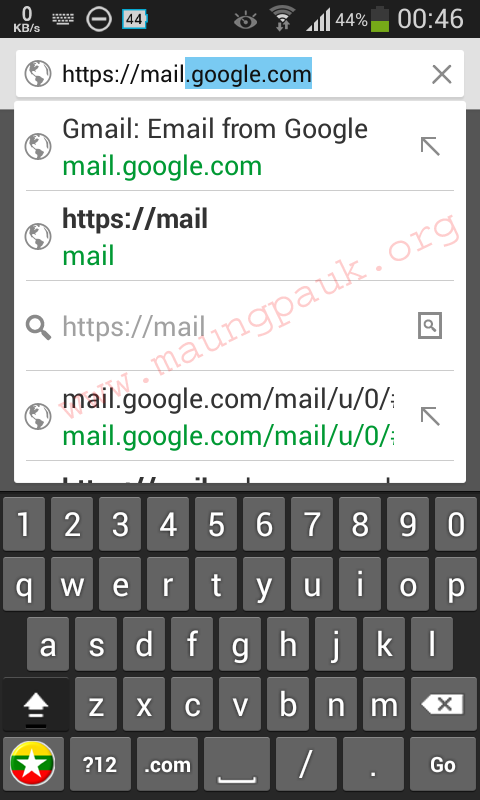
2. ဖုန္း အင္တာနက္ကို ဖြင့္ၿပီး Chrome Browser ရဲ႕ အေပၚဆံုးက Address Bar ထဲမွာ https://mail.google.com လို႔ရိုက္ထည့္ၿပီး Go ကိုႏွိပ္လိုက္ပါ..
ပထမဆံုး ကိုယ့္မွာ Facebook Account မဖြင့္ရေသးတဲ့ Gmail သစ္ တစ္ခု ရွိထားရပါမယ္.. မရွိရင္ Gmail အျမန္ဖြင့္နည္း ေျပာျပပါမယ္..
1. ဖုန္းမွာ Chrome Browser ရွိရပါမယ္.. အျခား Browser ေတြက အခ်ိန္ၾကာၿပီး အဆင္မေျပတာ မ်ားလို႔ပါ.. မရွိရင္ ေအာက္မွာ ေဒါင္းၿပီး Install လုပ္လိုက္ပါ..
Chrome Browser :
2. ဖုန္း အင္တာနက္ကို ဖြင့္ၿပီး Chrome Browser ရဲ႕ အေပၚဆံုးက Address Bar ထဲမွာ https://mail.google.com လို႔ရိုက္ထည့္ၿပီး Go ကိုႏွိပ္လိုက္ပါ..


 Myanmar Kyat Exchange Rate